If you want to install Oracle 23ai Free to a specific ORACLE_HOME rather than using /opt on Linux, you can do it by following the next instructions.
First, extract the cpio archive from the RPM package. I used 7-Zip for Windows.)))
Next, extract the cpio archive: cpio -idv < ./oracle-database-free-23ai-1.0-1.x86_64.cpio
After unpacking the cpio archive, you will have ./etc, ./opt, and ./usr.
In the folder ./opt/oracle/product/23ai/dbhomeFree, we can find what we are looking for—the Oracle 23ai Free distribution.
Copy or move the dbhomeFree folder to the desired ORACLE_HOME.
Installation: I recommend choosing Software Only, and then deploying the database later using DBCA.
During installation, you can select any edition, but it won’t make any difference.
There will also be around 18 errors related to library linking- skip them. For example:
Error in invoking target 'install' of makefile '/orcle/app/dbhome23ai/srvm/lib/ins_srvm.mk'.
Error in invoking target 'utilities' of makefile '/orcle/app/dbhome23ai/rdbms/lib/ins_rdbms.mk'.
Error in invoking target 'iokdstry iokinit' of makefile '/orcle/app/dbhome23ai/network/lib/ins_nau.mk'.
Error in invoking target 'install' of makefile '/orcle/app/dbhome23ai/network/lib/ins_net_server.mk'.
Error in invoking target 'itrcroute' of makefile '/orcle/app/dbhome23ai/network/lib/ins_net_client.mk'.
Error in invoking target 'irman' of makefile '/orcle/app/dbhome23ai/rdbms/lib/ins_rdbms.mk'.
Error in invoking target 'ioracle' of makefile '/orcle/app/dbhome23ai/rdbms/lib/ins_rdbms.mk'.
There will also be a warning that datapatch did not run.
Для того, чтобы установить Oracle 23AI Free RPM в отдельный ORACLE_HOME на Linux, а не в /opt нужно:
Извлечь из RPM пакета файлы, в нём один cpio архив. Для этой цели я использовал 7zip из под Windows(100% в Linux что-то тоже есть, но я ленивый)))).
Далее, извлекаем файлы из cpio архива: cpio -idv < ./oracle-database-free-23ai-1.0-1.x86_64.cpio
После распаковки архива, в текущей директории вы получите ./etc ./opt ./usr
В папке ./opt/oracle/product/23ai/dbhomeFree находится то что нам нужно, дистрибутив для установки. Папку ./user можно дропнуть, папку ./etc можно изучить.
Копируем/Перемещаем папку dbhomeFree в нужный нам ORACLE_HOME и запускаем ./runInstaller
Установка, рекомендую выбрать Software Only, а уже потом через dbca развернуть бд. При установке вы можете выбрать любую редакцию, но толку от этого ноль. Также будут ошибки, порядка 18, связанные с линковкой библиотек, пример:
Error in invoking target 'install' of makefile '/orcle/app/dbhome23ai/srvm/lib/ins_srvm.mk'.
Error in invoking target 'utilities' of makefile '/orcle/app/dbhome23ai/rdbms/lib/ins_rdbms.mk'.
Error in invoking target 'iokdstry iokinit' of makefile '/orcle/app/dbhome23ai/network/lib/ins_nau.mk'.
Error in invoking target 'install' of makefile '/orcle/app/dbhome23ai/network/lib/ins_net_server.mk'.
Error in invoking target 'itrcroute' of makefile '/orcle/app/dbhome23ai/network/lib/ins_net_client.mk'.
Error in invoking target 'irman' of makefile '/orcle/app/dbhome23ai/rdbms/lib/ins_rdbms.mk'.
Error in invoking target 'ioracle' of makefile '/orcle/app/dbhome23ai/rdbms/lib/ins_rdbms.mk'.
Так же, будет предупреждение, что не отработал datapatch. Не смотря на все ошибки, бд работает.
Many probably know that frequent commits are bad and slow, but how bad and how slow is not clear, and this small test is designed to demonstrate the impact of this event.
I’ll note right away that commits should be made exactly when the business process requires it, or when there is any other significant reason, rather than just ‘in case.’
Test environment:
Oracle 19.23
OS: OEL 8.5 4.18.0-513.24.1.el8_9.x86_64
RAM: 128GB
CPU: AMD Threadripper 1920x
Disks:
Disk group for data files: +ORADATA: SATA SSD GeIL R3 512GB
Disk group for redo logs: +ADATAD1: XPG GAMMIX S11 Pro PCI E 3.0 x4
Disk group for archive logs: +ARCHLOG: SATA SSD GeIL R3 512GB
+ORADATA and +ARCHLOG are located on the same physical disk SATA SSD GeIL R3 512GB.
The code that will act as the load (intensive business process activity):
Variant 1:
declare
v_loop number;
v_seq number;
v_text varchar2(3000);
v_rtext varchar2(3000);
begin
  execute immediate 'truncate table t1';
  dbms_output.put_line('Start: '||to_char(sysdate,'dd.mm.yyyy hh24:mi:ss'));
  dbms_workload_repository.create_snapshot;
  v_loop:=1;
  select dbms_random.string(opt => 'X',len => 3000) into v_rtext from dual;
  while v_loop<5000001
    loop
      v_seq:=t1_seq.nextval;
      insert into t1(id,text) values(v_seq,v_rtext);
      commit write wait;
      select t1.text into v_text from t1 where id=v_seq;
      update t1 set t1.text='update' where id=v_seq;
      commit write wait;
      delete from t1 where id=v_seq;
      commit write wait;
      v_loop:=v_loop+1;
      end loop;
      dbms_workload_repository.create_snapshot;
      dbms_output.put_line('End: '||to_char(sysdate,'dd.mm.yyyy hh24:mi:ss'));
   end;
Variant 2:
declare
v_loop number;
v_seq number;
v_text varchar2(3000);
v_rtext varchar2(3000);
begin
  execute immediate 'truncate table t1';
  dbms_output.put_line('Start: '||to_char(sysdate,'dd.mm.yyyy hh24:mi:ss'));
  dbms_workload_repository.create_snapshot;
  v_loop:=1;
  select dbms_random.string(opt => 'X',len => 3000) into v_rtext from dual;
  while v_loop<5000001
    loop
      v_seq:=t1_seq.nextval;
      insert into t1(id,text) values(v_seq,v_rtext);
      select t1.text into v_text from t1 where id=v_seq;
      update t1 set t1.text='update' where id=v_seq;
      delete from t1 where id=v_seq;
      commit write wait;
      v_loop:=v_loop+1;
      end loop;
      dbms_workload_repository.create_snapshot;
      dbms_output.put_line('End: '||to_char(sysdate,'dd.mm.yyyy hh24:mi:ss'));
   end;
The difference between the first and second options is that the first option has 3 commits within the loop, while the second has 1 commit within the loop. Also, the ‘commit write wait’ construct is chosen to avoid PL/SQL optimization, as this commit variant is used if the code is not written in PL/SQL.
Variant 1 took 23 minutes and 6 seconds (1386 seconds) to complete.
Variant 2 took 12 minutes and 51 seconds (771 seconds) to complete.
Variant 3 (commit executed only at the end of the loop) took 503 seconds, but it’s not considered for evaluation.
So, Variant 2 is nearly twice as fast.
Reasons why Variant 1 took longer:
Further calculations are done with a certain margin of error, and it is assumed that all statistics relate only to the tasks being performed.
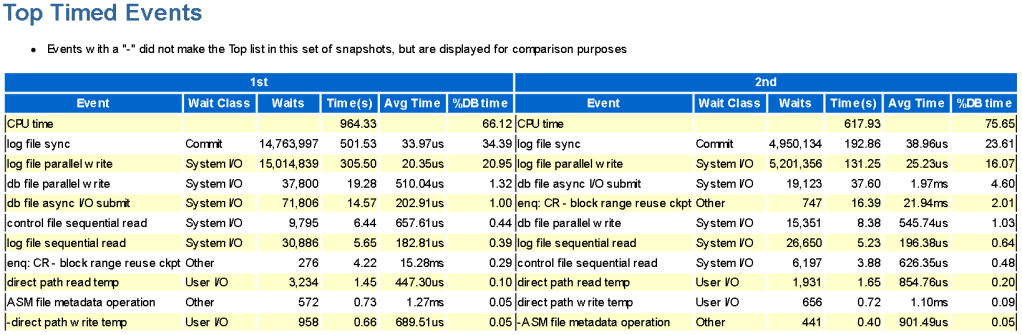
Variant 1 took 501 seconds for log file sync (lfs) out of 1386 seconds, while variant 2 took 192 seconds for log file sync (lfs) out of 771 seconds. By subtracting 501 from 1386, we get 885 seconds. Mathematically excluding all intermediate commits in the loop from variant 1, it still takes more time than variant 2, with 885 seconds versus 771 seconds.
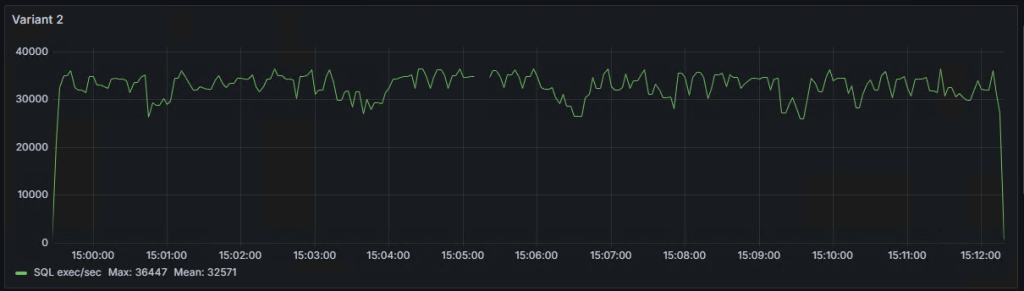
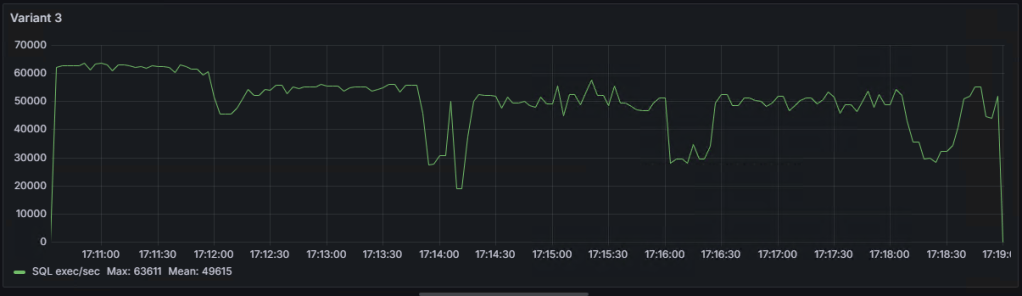
Graph of the number of SQL statement executions per second for ‘Variant 1,’ ‘Variant 2,’ and ‘Variant 3’:
As seen on the graphs, there are some ‘dips,’ the explanations for which I will try to provide in the following note.
Многие наверно знают, что частые коммиты — это плохо и медленно, но насколько плохо и насколько медленно, не понятно и данный маленький тест призван показать влияние этого события.
Сразу отмечу, что выполнять коммит нужно ровно тогда, когда этого требует бизнес-процесс, либо имеется любая другая веская причина, а не просто “на всякий случай”.
Тестовый стенд:
Oracle 19.23
OS: OEL 8.5 4.18.0-513.24.1.el8_9.x86_64
RAM: 128GB
CPU: AMD Threadripper 1920x
Диски:
Дисковая группа для датафайлов: +ORADATA: SATA SSD GeIL R3 512GB
Дисковая группа для редологов: +ADATAD1: XPG GAMMIX S11 Pro PCI E 3.0 х4
Дисковая группа для архивных логов: +ARCHLOG: SATA SSD GeIL R3 512GB
+ORADATA и +ARCHLOG расположены на одном физическом диске SATA SSD GeIL R3 512GB.
Код, который будет выступать в виде нагрузки (бурной деятельности бизнес-процессов):
Вариант номер 1:
declare
v_loop number;
v_seq number;
v_text varchar2(3000);
v_rtext varchar2(3000);
begin
  execute immediate 'truncate table t1';
  dbms_output.put_line('Start: '||to_char(sysdate,'dd.mm.yyyy hh24:mi:ss'));
  dbms_workload_repository.create_snapshot;
  v_loop:=1;
  select dbms_random.string(opt => 'X',len => 3000) into v_rtext from dual;
  while v_loop<5000001
    loop
      v_seq:=t1_seq.nextval;
      insert into t1(id,text) values(v_seq,v_rtext);
      commit write wait;
      select t1.text into v_text from t1 where id=v_seq;
      update t1 set t1.text='update' where id=v_seq;
      commit write wait;
      delete from t1 where id=v_seq;
      commit write wait;
      v_loop:=v_loop+1;
      end loop;
      dbms_workload_repository.create_snapshot;
      dbms_output.put_line('End: '||to_char(sysdate,'dd.mm.yyyy hh24:mi:ss'));
   end;
Вариант номер 2:
declare
v_loop number;
v_seq number;
v_text varchar2(3000);
v_rtext varchar2(3000);
begin
  execute immediate 'truncate table t1';
  dbms_output.put_line('Start: '||to_char(sysdate,'dd.mm.yyyy hh24:mi:ss'));
  dbms_workload_repository.create_snapshot;
  v_loop:=1;
  select dbms_random.string(opt => 'X',len => 3000) into v_rtext from dual;
  while v_loop<5000001
    loop
      v_seq:=t1_seq.nextval;
      insert into t1(id,text) values(v_seq,v_rtext);
      select t1.text into v_text from t1 where id=v_seq;
      update t1 set t1.text='update' where id=v_seq;
      delete from t1 where id=v_seq;
      commit write wait;
      v_loop:=v_loop+1;
      end loop;
      dbms_workload_repository.create_snapshot;
      dbms_output.put_line('End: '||to_char(sysdate,'dd.mm.yyyy hh24:mi:ss'));
   end;
Отличие первого и второго варианта в том, что первый вариант имеет 3 коммита в цикле, а второй 1 коммит в цикле. Также, конструкция commit write wait выбрана для того, чтобы избежать оптимизации PL/SQL, т.к. данный вариант коммита применяется если код написан не на PL/SQL.
Вариант 1, выполнился за 23 минуты и 6 секунд(1386 секунд)
Вариант 2, выполнился за 12 минут и 51 секунду(771 секунд).
В не зачёта: Вариант 3(коммит выполняется только по окончанию цикла), выполнился за 503 секунды.
Т.е. вариант 2 быстрее почти в 2 раза.
На что вариант 1 потратил время(почему он медленнее):
Далее расчеты делаются с определённой погрешностью и предполагается, что все статистики относятся только к выполняемым задачам.
Вариант 1 из 1386 секунд, потратил на log file sync(lfs) 501 сек, а вариант 2 из 771 секунд, потратил на log file sync(lfs) 192 сек. Отняв от 1386, 501, получим 885 сек, т.е. математически исключим все промежуточные коммиты в цикле из варианта 1, всё равно вариант 1 затрачивает времени больше, чем вариант 2, 885сек против 771сек.
График количества выполнений SQL выражений в секунду для “вариант 1”,“вариант 2” и “вариант 3”:
Как видно на графиках, есть некие “провалы”, объяснения которым я попробую дать в следующей заметке.
After installing DBRU19.19 on 19.9, one table started to grow linearly. The table is a buffer, with insertion and almost immediate deletion. The table consistently holds around 1000 rows, but its volume increases every day. Upon searching on Oracle Support, Bug 30265523 was found — blocks are not marked as free in Automatic Segment Space Management (ASSM) after deletion — 12.2 and later (Doc ID 30265523.8).
After dumping the first level bitmap block of free space in the extent, I see the following picture:
We observe rejection code 3, and all blocks are marked as FULL. This fully coincides with the description of the bug, which supposedly has been fixed. If we dump a block with data, there will be only one row in it, marked as deleted (—HDFL—). It is worth noting that the problematic table has several varchar2(4000) fields, out of which always two fields are filled up to the brim, and sometimes three fields, while the rest are always null. The table does not have any chained and migrated rows.
Further experiments have shown that:
Disabling or setting _enable_rejection_cache = false does not help or worsens the situation.
Disabling _assm_segment_repair_bg=false does not help either.
The combination of _enable_rejection_cache = false and _fix_control=’32075777:ON’ does not help either.
The potential solution (a workaround) may only be setting one parameter: _fix_control=’32075777:ON’.
Setting _fix_control=’32075777:ON’ has helped maintain the table within normal size limits. Under constant load, the table stopped growing. With the same load, in 19.9 the table had a size of a couple of hundred megabytes, while in 19.19 with _fix_control=’32075777:ON’, the growth stopped at around 1GB. Also, upon setting _fix_control=’32075777:ON’, a non-zero metric ASSM_bg_slave_fix_state appeared, which apparently increases after fixing the status of blocks in the bitmap, and x$ktsp_repair_list started to fill up (I assume this displays a list of segments on which the segment repair mechanism has been activated). I have opened an SR.
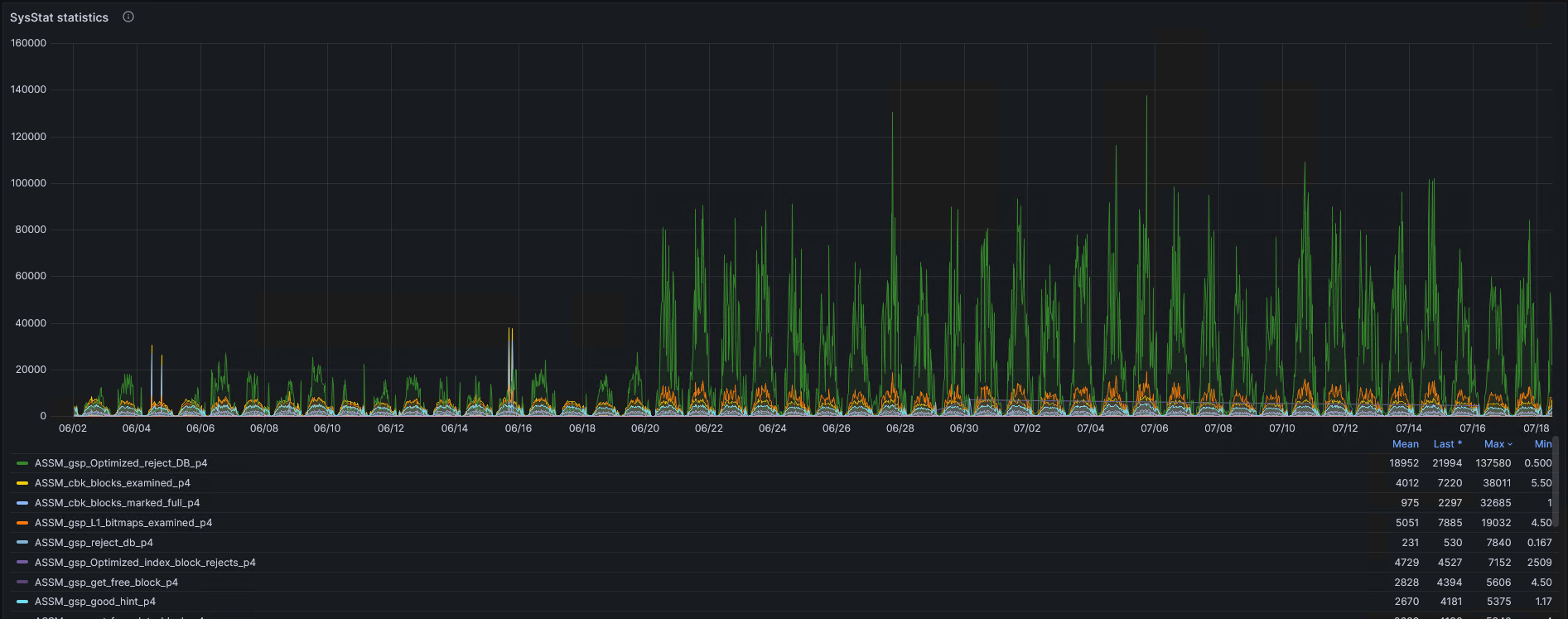
Overall, how has the operation of ASSM changed? Before 06/21, the database was running on DBRU 19.9, and after 6/20, on 19.19.
Issue: There is a dead transaction rolling back at a rate of 1-2 blocks per second, blocking the execution of update/delete/insert with a wait for transaction (event#=1074, name=transaction). Oracle Version: 19.21.
Since transaction rollback can take a considerable amount of time, it’s essential to assist this process. To do this, you need to drop the object associated with the transaction causing the slow rollback. How to determine the object that needs to be dropped? This might not be straightforward because the transaction could involve multiple tables. In my case, I enabled tracing 10046 for the SMON process, in which there were waits like ‘enq: CR — block range reuse ckpt’ obj#=MyProblematicObject. Additionally, I dumped the header of the undo segment (alter system dump undo header «_SegmentName») and the undo blocks associated with the transaction (alter system dump undo block «_SegmentName» XID number_USN number_SLT number_SEQ).
Where do we get what?
USN, SLT,SEQ-  from select * from v$fast_start_transactions
_SegmentName- from Select * from v$rollname where usn = USN
In the dump of blocks associated with the transaction, there is a lot of this:
There are suspicions that KTSL stands for Kernel Transaction Segment LOB, but this is not certain. In the dump of the undo header and in the dump of blocks associated with the transaction, there should be a connection as follows: in the undo segment header in the TRN TBL section, the cmt column has a value of 0, and in the dba column at the same level, there are coordinates of the block. Dumping this block, we will enter the UBA, which is associated with ‘alter system dump undo block «_SegmentName» XID number_USN number_SLT number_SEQ’
After analyzing a lot of text, I select the necessary object and drop it.))
alter system set "_smu_debug_mode"=1024;
oradebug setospid <ospid of SMON process>
oradebug event 10513 trace name context forever, level 2
drop table owner.table purge;
purge recyclebin;
oradebug event 10513 trace name context off
alter system set "_smu_debug_mode"=0;
Also, I used fast_start_parallel_rollback=false; (changing this parameter can stop the rollback process, either the instance needs to be restarted or attempt to revive SMON)
Useful notes:
Database Hangs Because SMON Is Taking 100% CPU Doing Transaction Recovery (Doc ID 414242.1)
IF: Transaction Recovery or Rollback of Dead Transactions (Doc ID 1951738.1)
I would like to highlight:
Bug 11790175 — SMON spins in rollback of LOB due to double allocated block like bug 11814891 (Doc ID 11790175.8)
This is an ancient bug, the description of which in my case coincides only on two criteria: Slow rollback Problematic object is LOB.
UNDO and REDO, a complex topic… perhaps there is a simpler method.
Проблема: Имеется мёртвая(Dead) транзакция которая откатывается со скоростью 1-2 блока в секунду, которая блокирует выполнение update/delete/insert с ожиданием transaction(event#=1074, name=transaction). Версия Oracle: 19.21.
Т.к. откат транзакции может занять значительное время, самое время как то помочь этому процессу. Для этого, нужно дропнуть обьект, с которым связана транзакция из-за которого откат идёт очень медленно. Как определить объект который нужно дропунуть? Вот тут всё может быть не однозначно, т.к. в транзакции может быть замешано N таблиц. В моём случае я включил трассировку 10046 для процесса SMON, в которой были ожидания вида ‘enq: CR — block range reuse ckpt’ obj#=МойПроблемныйОбъект, далее я сдампил ещё заголовок undo сегмента(alter system dump undo header «_ИмяСегмента») и ундо блоки связанные с транзакцией (alter system dump undo block «_ИмяСегмента» XID номер_USN номер_SLT номер_SEQ).
Откуда, что берём:
USN, SLT,SEQ-  из select * from v$fast_start_transactions
_ИмяСегмента- из Select * from v$rollname where usn = USN
В дампе блоков связанных с транзакцией кучи вот такого:
Есть подозрения, что KTSL это -Kernel Transaction Segment LOB, но это не точно. В дампе заголовка ундо и в дампе блоков связанных с транзакцией, должна быть связь в виде: в заголовке ундо сегмента в разделе TRN TBL, в колонке cmt есть значение 0, а в колонке dba на этом же уровне, имеются координаты блока, сдампив который, мы попадём в UBA, который связан с alter system dump undo block «_ИмяСегмента» XID номер_USN номер_SLT номер_SEQ.
Нужно взять книжку Oracle Core от Jonathan Lewis, и ещё раз перечитать....
Проанализировав кучу текста, выбираем нужный обьект и дропаем))):
alter system set "_smu_debug_mode"=1024;
oradebug setospid <ospid of SMON process>
oradebug event 10513 trace name context forever, level 2
drop table owner.table purge;
purge recyclebin;
oradebug event 10513 trace name context off
alter system set "_smu_debug_mode"=0;
Так же, я использовал fast_start_parallel_rolback=false;(переключение этого параметра может остановить процесс отката, тут либо инстанс перезапускать, либо пытаться оживить SMON).
Откат транзакции ускорится в сотни раз. Как завершится, создаём таблицу по новой.
Полезные ноты:
Database Hangs Because SMON Is Taking 100% CPU Doing Transaction Recovery (Doc ID 414242.1)
IF: Transaction Recovery or Rollback of Dead Transactions (Doc ID 1951738.1)
Отдельно хочу отметить:
Bug 11790175 — SMON spins in rollback of LOB due to double allocated block like bug 11814891 (Doc ID 11790175.8)
Это древний баг, описание которого в моём случае совпадает только по двум критериям:
Медленный откат
Проблемный объект: LOB
UNDO и REDO, тяжелая тема… возможно есть метод и попроще.
Коротенькая заметка про очередные грабли, всплывшие где-то с 19.16, но так-же существуют в плоть до 19.22.
Дано:
Oracle: 19.22
OS: Oracle Linux Server release 8.3
Kernel: 5.4.17-2011.7.4.el8uek.x86_64
При старте БД наблюдаем в алерт логе такую картину:
Starting background process VKTM
Errors in file /oracle/app/oracle/diag/rdbms/orcl/orcl/trace/orcl_vktm_61290.trc  (incident=146927):
ORA-00800: soft external error, arguments: [Set Priority Failed], [VKTM], [Check traces and OS configuration], [Check Oracle document and MOS notes], []
Incident details in: /oracle/app/oracle/diag/rdbms/orcl/orcl/incident/incdir_146927/orcl_vktm_61290_i146927.trc
Error attempting to elevate VKTM's priority: no further priority changes will be attempted for this process


Starting background process LGWR
Errors in file /oracle/app/oracle/diag/rdbms/orcl/orcl/trace/orcl_lgwr_61456.trc  (incident=147055):
ORA-00800: soft external error, arguments: [Set Priority Failed], [LGWR], [Check traces and OS configuration], [Check Oracle document and MOS notes], []
Incident details in: /oracle/app/oracle/diag/rdbms/orcl/orcl/incident/incdir_147055/orcl_lgwr_61456_i147055.trc

Starting background process DBW0
Errors in file /oracle/app/oracle/diag/rdbms/orcl/orcl/trace/orcl_dbw0_61444.trc  (incident=147039):
ORA-00800: soft external error, arguments: [Set Priority Failed], [DBW0], [Check traces and OS configuration], [Check Oracle document and MOS notes], []
Incident details in: /oracle/app/oracle/diag/rdbms/orcl/orcl/incident/incdir_147039/orcl_dbw0_61444_i147039.trc
Просмотрев трейсы, находим много общего, а именно:
Error Info: Category(-2), Opname(skgdism_send), Loc(sp.c:setpr:0), ErrMsg(Operation not permitted) Dism(128)
Если пойти на MOS то можно найти ноту ORA-00800: soft external error, arguments: [Set Priority Failed], [VKTM] (Doc ID 2931494.1), которая, как по мне, ведёт в тупик(если конечно у вас на $ORACLE_HOME/bin/oradism установлены верные разрешения root:oinstall 4750), особенно если у вас 19.22.
Я же просто установил cgroup_disable=cpu в grub.
vi /etc/default/grub. Добавляем cgroup_disable=cpu в секцию GRUB_CMDLINE_LINUX.
Далее выполнить:
Для легаси BIOS: grub2-mkconfig —output=/boot/grub2/grub.cfg
Для UEFI: grub2-mkconfig —output=/boot/efi/EFI/redhat/grub.cfg.
[root@perfdbhost ~]# grub2-mkconfig --output=/boot/grub2/grub.cfg
Generating grub configuration file ...
device-mapper: reload ioctl on osprober-linux-nvme0n4p1 (252:2) failed: Device or resource busy
Command failed.
device-mapper: reload ioctl on osprober-linux-nvme0n5p1 (252:2) failed: Device or resource busy
Command failed.
Done
Перезагружаем хост.
P.S. В дальнейшем можно убрать cgroup_disable=cpu, процессы не получают(??) ошибок Set Priority Failed.
Из серии «никогда такого не было, и вот опять». Данная ошибка по сути является багом и её не должно быть. Первые упоминания о исправлении данной ошибки датируются версией 7.3.3(да, да, очень старая) и заканчиваются на отметке версии 10.1.0.2. Но как бы не так, данная ошибка воспроизводится(не всегда, но достаточно часто) в 19.3 и 19.19. Стоит отметить, что ошибка нашлась при синтетических тестах.
Для воспроизведения ошибки, нужно:
create table t1(
id varchar2(4000));
alter table t1 add constraint idpk primary key(id);
create sequence t1seq cache 5000;
Сам тест:
Запустить 5-10 конкурентных сессий, без использования PL/SQL, используя только sql:
После установки DBRU19.19 на 19.9, одна таблица стала линейно подрастать. Таблица буферная, в неё идёт вставка и практически стразу идёт удаление, в таблице постоянно находится порядка 1000 строк, но каждый день таблица прибавляет в объёме. При поиске на oracle support был найдет Bug 30265523 — blocks are not marked as free in assm after delete — 12.2 and later (Doc ID 30265523.8) .
Выполнив дамп блока первого уровня битовой карты свободного места в экстете(first level bitmap block) вижу вот такую картину:
Наблюдаем rejectioncode 3, ну и все блоки FULL. Что полностью совпадает с описанием бага, который как бы исправлен. Если сделать дамп блока с данными, то в нём будет всего одна строка, которая имеет пометку, что она удалена(—HDFL—). Стоит отметить, что проблемная таблица имеет несколько полей varchar2(4000), из которых под завязку заполняется всегда 2 поля, а иногда 3 поля, остальные поля всегда null, связанных и смигированных(chained and migrated rows) строк таблица не имеет.
Дальнейшие эксперименты показали, что:
Не помогает или делает хуже _enable_rejection_cache = false
Не помогает _assm_segment_repair_bg=false
Комбинация _enable_rejection_cache = false и _fix_control=’32075777:ON’, не помогает.
Потенциальным решением(костылём) может является только установка одного параметра _fix_control=’32075777:ON’.
Выставив _fix_control=’32075777:ON’, можно удержать таблицу в нормальных рамках размера. При постоянной нагрузке, таблица остановила свой рост. При одинаковой нагрузке, в 19.9 таблица имелеа размер в пару сотен мегабайт, в 19.19 с _fix_control=’32075777:ON’, рост остановился на отметке в 1Гб. Также при установки _fix_control=’32075777:ON’, появилась не нулевая метрика ASSM_bg_slave_fix_state, которая по видимому увеличивается после того, как фиксится статус блоков в битовой карте, и стала заполнятся x$ktsp_repair_list(я так понимаю, здесь отображён список сегментов, по которым сработал механизм починки сегмента). SR я завёл.
Ну и в целом, как изменилась работа ASSM. До 06/21 бд работала на DBRU 19.9, после 6/20 на 19.19:

 krotovks.com