Given: Oracle 19.19, RHEL8, block size 8k.
After installing DBRU19.19 on 19.9, one table started to grow linearly. The table is a buffer, with insertion and almost immediate deletion. The table consistently holds around 1000 rows, but its volume increases every day. Upon searching on Oracle Support, Bug 30265523 was found — blocks are not marked as free in Automatic Segment Space Management (ASSM) after deletion — 12.2 and later (Doc ID 30265523.8).
After dumping the first level bitmap block of free space in the extent, I see the following picture:
--------------------------------------------------------

  DBA Ranges :

  --------------------------------------------------------

   0x04000080  Length: 64     Offset: 0


   0:Metadata   1:Metadata   2:FULL   3:FULL
   4:FULL   5:FULL   6:FULL   7:FULL
   8:FULL   9:FULL   10:FULL   11:FULL
   12:FULL   13:FULL   14:FULL   15:FULL
   16:FULL   17:FULL   18:FULL   19:FULL
   20:FULL   21:FULL   22:FULL   23:FULL
   24:FULL   25:FULL   26:FULL   27:FULL
   28:FULL   29:FULL   30:FULL   31:FULL
   32:FULL   33:FULL   34:FULL   35:FULL
   36:FULL   37:FULL   38:FULL   39:FULL
   40:FULL   41:FULL   42:FULL   43:FULL
   44:FULL   45:FULL   46:FULL   47:FULL
   48:FULL   49:FULL   50:FULL   51:FULL
   52:FULL   53:FULL   54:FULL   55:FULL
   56:FULL   57:FULL   58:FULL   59:FULL
   60:FULL   61:FULL   62:FULL   63:FULL

  --------------------------------------------------------
  ktspfsc -
  nro:62 ncmp:0 nff:62 nxo:1 lastxs:30 nxid:1 ff:30
  clntime: 1689652737 addtime:0 spare1:0 spare2:0
  ro: rejection opcode, xo: xid offset List
  0. ro:0 xo:-1  1. ro:0 xo:-1  2. ro:3 xo:-1  3. ro:3 xo:-1
  4. ro:3 xo:-1  5. ro:3 xo:-1  6. ro:3 xo:-1  7. ro:3 xo:-1
  8. ro:3 xo:-1  9. ro:3 xo:-1  10. ro:3 xo:-1  11. ro:3 xo:-1
  12. ro:3 xo:-1  13. ro:3 xo:-1  14. ro:3 xo:-1  15. ro:3 xo:-1
  16. ro:3 xo:-1  17. ro:3 xo:-1  18. ro:3 xo:-1  19. ro:3 xo:-1
  20. ro:3 xo:-1  21. ro:3 xo:-1  22. ro:3 xo:-1  23. ro:3 xo:-1
  24. ro:3 xo:-1  25. ro:3 xo:-1  26. ro:3 xo:-1  27. ro:3 xo:-1
  28. ro:3 xo:-1  29. ro:3 xo:-1  30. ro:3 xo:-1  31. ro:3 xo:-1
  32. ro:3 xo:-1  33. ro:3 xo:-1  34. ro:3 xo:-1  35. ro:3 xo:-1
  36. ro:3 xo:-1  37. ro:3 xo:-1  38. ro:3 xo:-1  39. ro:3 xo:-1
  40. ro:3 xo:30  41. ro:3 xo:-1  42. ro:3 xo:-1  43. ro:3 xo:-1
  44. ro:3 xo:-1  45. ro:3 xo:-1  46. ro:3 xo:-1  47. ro:3 xo:-1
  48. ro:3 xo:-1  49. ro:3 xo:-1  50. ro:3 xo:-1  51. ro:3 xo:-1
  52. ro:3 xo:-1  53. ro:3 xo:-1  54. ro:3 xo:-1  55. ro:3 xo:-1
  56. ro:3 xo:-1  57. ro:3 xo:-1  58. ro:3 xo:-1  59. ro:3 xo:-1
  60. ro:3 xo:-1  61. ro:3 xo:-1  62. ro:3 xo:-1  63. ro:3 xo:-1
We observe rejection code 3, and all blocks are marked as FULL. This fully coincides with the description of the bug, which supposedly has been fixed. If we dump a block with data, there will be only one row in it, marked as deleted (—HDFL—). It is worth noting that the problematic table has several varchar2(4000) fields, out of which always two fields are filled up to the brim, and sometimes three fields, while the rest are always null. The table does not have any chained and migrated rows.
Further experiments have shown that:
- Disabling or setting _enable_rejection_cache = false does not help or worsens the situation.
- Disabling _assm_segment_repair_bg=false does not help either.
- The combination of _enable_rejection_cache = false and _fix_control=’32075777:ON’ does not help either.
- The potential solution (a workaround) may only be setting one parameter: _fix_control=’32075777:ON’.
Setting _fix_control=’32075777:ON’ has helped maintain the table within normal size limits. Under constant load, the table stopped growing. With the same load, in 19.9 the table had a size of a couple of hundred megabytes, while in 19.19 with _fix_control=’32075777:ON’, the growth stopped at around 1GB. Also, upon setting _fix_control=’32075777:ON’, a non-zero metric ASSM_bg_slave_fix_state appeared, which apparently increases after fixing the status of blocks in the bitmap, and x$ktsp_repair_list started to fill up (I assume this displays a list of segments on which the segment repair mechanism has been activated). I have opened an SR.
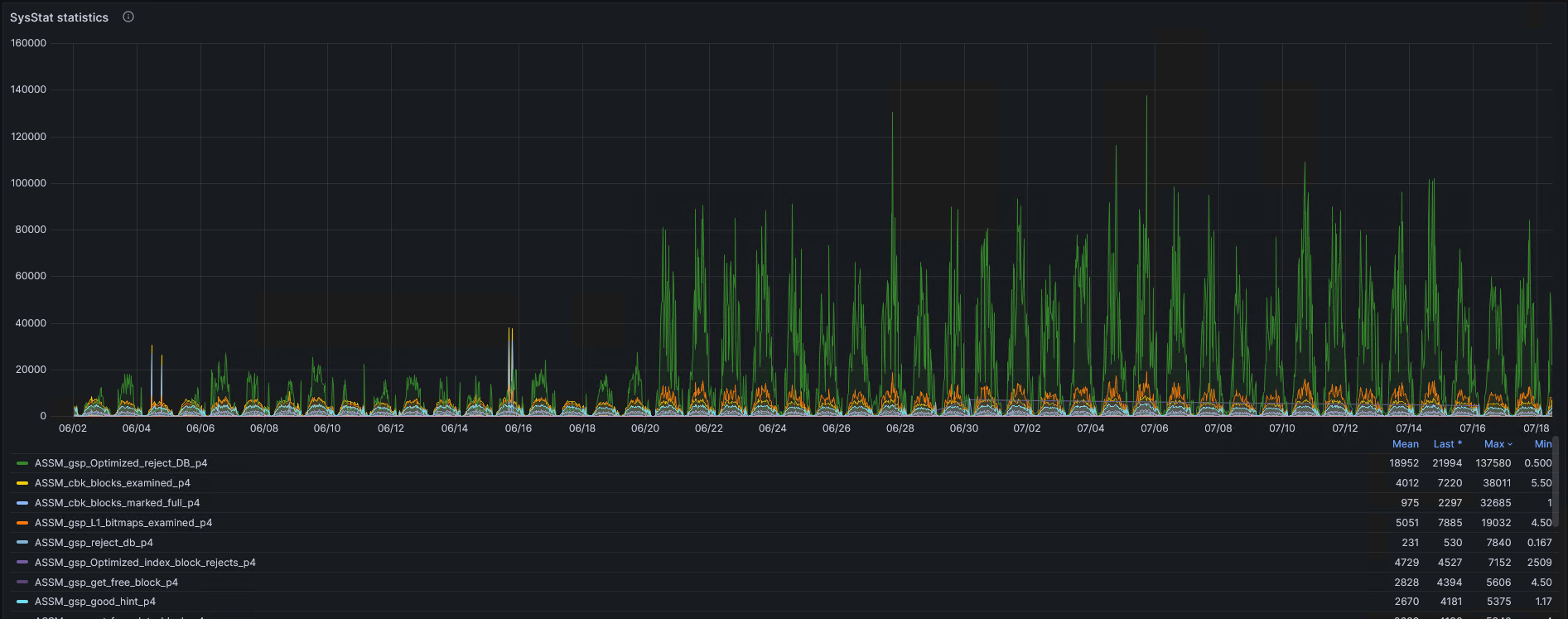
Overall, how has the operation of ASSM changed? Before 06/21, the database was running on DBRU 19.9, and after 6/20, on 19.19.
 krotovks.com